I Made a Free Curved Text UI Tool for Unity While working on different Unity projects, I kept running into the same small but annoying problem: curved UI text. Menus, badges, circular buttons, arcade-style UI — curved text shows up everywhere. And every time, I’d end up either hacking something together, duplicating prefabs, or writing custom math that I knew I’d have to redo in the next project. Unity doesn’t really give you a clean, reusable way to do curved TextMeshPro UI out of the box. Most solutions online are very specific, hard to customize, or break easily when you change font size or layout. So instead of solving it over and over again, I decided to turn it into a proper reusable component and release it for free. That’s how Curved Text Component – Ultimate UI Toolkit came to life. You can get it here on the Unity Asset Store: https://assetstore.unity.com/packages/tools/gui/curved-text-component-ultimate-ui-toolkit-297396 The Goal My goal with this asset was simple: I wanted...
Posts
Frontend vs Backend Is Commonly Misinterpreted
- Get link
- X
- Other Apps
People mix up frontend and backend all the time, and honestly it’s not because the concepts are hard. It’s because we keep explaining them in a lazy way. The usual explanation goes something like this: frontend is how it looks, backend is the logic. It’s quick, it kind of works at first, and it’s also the root of most of the confusion. The real difference isn’t about visuals versus logic. It’s about where the code runs. Frontend code runs on the client’s device . That could be a browser, a phone, a desktop app, a game, whatever. A lot of the time that code is responsible for UI, so people start equating the two. But UI isn’t what makes something frontend, it’s just a common consequence of running code on the client. You can have frontend code that doesn’t show anything at all. Background services, sync processes, local validation, state management, offline handling. No buttons, no screens, still frontend. Saying frontend is “the UI” is like saying a house is defined by having a bed. Mo...
How to fix Unity Error: Failed to update Android SDK package list
- Get link
- X
- Other Apps
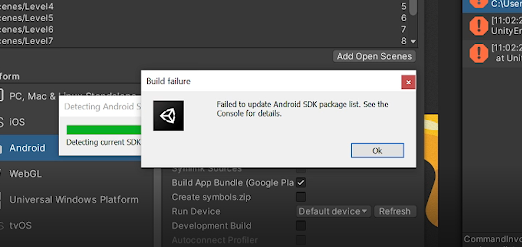
Today's post is about the Unity "Failed to update Android SDK package list" error, which can be quite annoying if you don't know how to fix it (speaking from experience). Disclaimer: I don't know what causes this issue, and also I can't guarantee this will fix it for you, but it's defienetly worth a try since it's a very simple process that can take less than a minute. It's worth mentioning I managed to find this solution through trial and error. Everytime I get it, this process fixes it so hopefully it will fix it for you too. Without further ado, here are the steps: 1. Open Player settings File > Build Settings > Player Settings 2. Change the Target API level to Android 11.0 (API level 30) Other Settings > find "Target API level" > and change whatever you have (most ...
I made a game under 24 hours
- Get link
- X
- Other Apps
Gum Drup is the name of the game. I started this project as a 24 hours challenge. However, I have kept working on it because I want to publish it as an official game. Concept of the game The game consists on a gumball that stick to walls trying to collect stars, in order to unlock new levels. The idea of a slimy ball sticking to walls just really stuck with me, I felt it would be really cool, and satisfying. I came up with the idea during the 24 hours. I feel it had to be like that otherwise it wouldn't be a 24 hours challenge since I consider it to be the most challenging and tricky part. Nevertheless, I came up with it really quickly. Initially it was gonna be a slime ball, but I then changed it to a gumball thanks to my sister, which also came up with the name: "GumDrop". Challenges With the idea settled, everything went pretty smooth. I managed to get the mechanic exactly how I wanted right away, and I was doing a lot of progress really fast. It wasn't un...